DeepSeek Harness: GitHub Webhook Reviews
DeepSeek Harness can create a read-only review Session from a signed GitHub webhook by installing the experimental webhook packages, applying the review overlay, and exposing only its dedicated endpoint through TLS.
DeepSeek Harness: What triggers a review Session?
The GitHub review guide describes an opt-in overlay for dsh web. Its example rule accepts source primary-github, repository deepseek-ai/deepseek-harness, event pull_request, and action ready_for_review. A matching transition from draft to ready for review starts a titled root Session under the repository's Web Workspace. It passes the exact head SHA and selected PR fields to a read-only review prompt, marking the JSON as untrusted metadata.
This is a concrete example, not a rule that automatically watches every repository. A different repository requires a deliberate rule customization. The example forbids changes to files, branches, PRs and GitHub state, and selects the standard agent preset and read-only permission preset. The webhook secret authenticates incoming data; it does not grant the agent outbound GitHub access.
DeepSeek Harness: What needs to be installed and configured?
Prepare a local checkout that DSH can register as a Web Workspace, a high-entropy webhook secret, and a TLS reverse proxy or tunnel able to forward a single public URL to the loopback listener. In GitHub, subscribe to Pull requests with content type application/json. The example defaults to the launch directory and 127.0.0.1:3081; DSH_GITHUB_REVIEW_WORKSPACE and DSH_GITHUB_WEBHOOK_PORT can override them.
- Generate a high-entropy secret, store it securely, and make the same value available as
DSH_GITHUB_WEBHOOK_SECRETacross restarts. Configure GitHub with that value without publishing it. - Install both experimental packages into the Web profile. The profile does not install peer dependencies automatically:
dsh plugin --profile web add @deepseek-ai/dsh-webhook @deepseek-ai/dsh-webhook-github
- Set
DSH_GITHUB_REVIEW_WORKSPACEto the intended local checkout and start the published example overlay:
export DSH_GITHUB_REVIEW_WORKSPACE=/path/to/deepseek-harness
dsh web --patch "${DSH_HOME:-$HOME/.dsh}/profiles/web/node_modules/@deepseek-ai/dsh-webhook-github/examples/github-review/cordis.yml"
- Expose the dedicated listener through HTTPS and configure the GitHub payload URL as the public
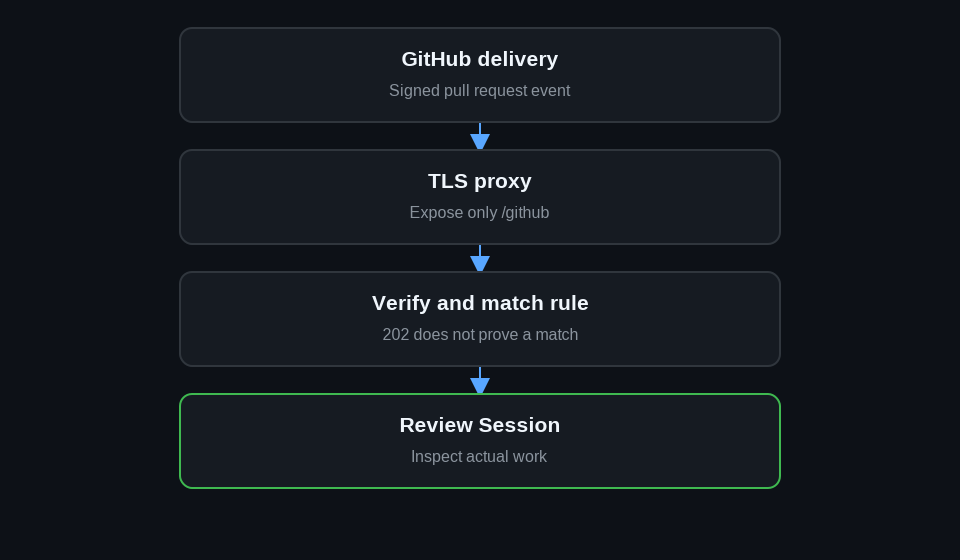
/githubendpoint. Set the content type, secret and event subscription as above. - Trigger a matching transition and inspect both the delivery and the resulting Web Workspace and Session. A successful HTTP response alone does not establish that the rule matched or a review ran.
Installing the packages and supplying the overlay are separate steps; the CLI does not ship those packages or list them as Official plugins. The adapter distributes the example inside the profile installation so the rule can resolve its peers. To customize, the guide says to copy both example files into the profile's github-review directory, edit the configuration, and point --patch at that copy. Running the rule from an arbitrary directory outside the profile is not the documented setup.
DeepSeek Harness: What should the public endpoint expose?
The main Web UI and /api remain on port 3080. The overlay mounts a second WebServer in an isolated realm: it registers POST /github, and other paths return 404. The guide shows a Caddy example that forwards only /github to 127.0.0.1:3081 and responds 404 elsewhere. Its proxy is an exposure boundary for that listener, not a substitute for the webhook signature.
| Component | Role | Separate concern |
|---|---|---|
| TLS proxy or tunnel | Makes the dedicated endpoint reachable | Incoming signature verification |
| Webhook secret | Authenticates incoming GitHub data | Outbound GitHub permissions |
| Rule | Filters event and builds review request | Durable delivery tracking |
| Session | Owns work after prompt admission | Proof that every delivery matched |
The public deployments guide separately explains how to publish the browser UI. Do not infer that exposing the webhook listener requires publishing the UI. The web-server reference describes the HTTP carrier and notes that individual compositions own their route and authentication policy.
DeepSeek Harness: Does HTTP 202 mean the review finished?
No. The guide defines 202 as signature and JSON accepted, with rule calls scheduled in memory. It does not establish that the example rule matched, that a Session was created, or that the agent completed a review. Compare the event, action and repository with the rule, then inspect the Workspace and Session for actual work.
The runtime stores neither delivery nor execution state. A repeated delivery runs the rule again and may create another Session. A crash loses rule calls whose prompt has not yet been admitted. Once admitted, ordinary Session logs, persistence, Workspace and agent lifecycle own the work. Therefore, reconcile deliveries with actual Sessions instead of treating an HTTP success as a durable queue or deduplication guarantee.
The first matching delivery creates the Workspace if absent through WorkspaceRegistry.create(); later deliveries reuse it. This makes the local path important: make sure the checkout is the one intended for the rule. A valid signature confirms the origin of the inbound payload under the shared secret; it does not prove that the checkout has the expected content or that the review has reached a desired outcome.
How can you investigate a missing review?
Follow the chain in order. First check that GitHub delivered the subscribed event to the intended public URL and that the configured secret matches the value available to the running process. Next check the dedicated proxy route and the loopback listener. Then compare the payload's event, action, source and repository with the example rule. A different repository or a PR event other than the documented ready-for-review transition can be accepted as a delivery without matching this rule.
After that, inspect the intended local Workspace and the Session list. The example uses the launch directory unless overridden, so an unexpected working directory can lead you to inspect the wrong checkout. Check actual Session activity and output rather than interpreting 202 as completion. Sanitize delivery details before sharing them: payloads can contain repository metadata and the secret must never appear in an issue or a diagnostic transcript.
What changes when you customize the rule?
The guide's rule is trusted JavaScript and can be extended to consult a policy service or map repositories to local paths. That flexibility moves decisions into code you operate. Review the repository allowlist, path mapping and error handling, and test the match and non-match cases with an appropriate environment. A signature authenticates the delivery; it does not turn the PR's title, description or other fields into trusted instructions. Preserve the example's treatment of PR JSON as untrusted metadata when adapting the review prompt.
A deployment can need outbound access for its own workflow, but the inbound secret does not supply it. Decide separately which component needs what authority and how that authority is provisioned. The example also forbids mutations, so automatic posting or changing a PR should not be inferred from the presence of a review Session. Those behaviors require an independently designed and authorized integration.
Delivery reliability is another independent decision. The documented runtime keeps no delivery or execution state, and a retry may cause another Session. If your workflow needs deduplication or recovery beyond those semantics, design and verify it outside the assumptions in this guide. Preserve the event identity and the actual review outcome in your own operational records, without claiming that the example implements exactly-once processing.
DeepSeek Harness: What are the limits and safety boundaries?
Treat the secret as a credential and keep it out of logs, public issues and example configuration. Limit public forwarding to the dedicated endpoint, protect the listener's network path, and review the proxy setup. A rule's run() is trusted JavaScript: customizing it can add network calls or change how repositories map to paths, so review that code and its deployment authority. PR fields are untrusted input even when the delivery signature is valid.
Read-only is the example's selected permission preset and prompt intent, not a guarantee that every surrounding system is isolated. The sources do not promise exactly-once delivery or automatic publication of review comments. Outbound GitHub access requires separate configuration when needed. For browser publication, see the reverse-proxy guide.
DeepSeek Harness: What do these terms mean?
- Webhook: an HTTP delivery initiated by GitHub for subscribed events.
- Overlay: the configuration patch that adds the example listener and rule to the Web profile.
- Workspace: the registered local checkout under which the review Session is created.
- Head SHA: the exact PR revision passed to the review prompt by the example rule.
- Prompt admission: the point after which normal Session persistence and lifecycle own the work.
Frequently asked questions
Does HTTP 202 mean a review Session exists?
No. It means the signature and JSON were accepted and rule calls scheduled, not that a rule matched.
Does the secret grant GitHub API access?
No. It authenticates inbound data; outbound access must be configured separately.
Are repeated deliveries deduplicated?
The runtime stores no delivery state; repeated deliveries may create another Session.
Sources
Every claim in this article was checked against the sources below. Community discussions are user reports, not official behavior.
This is an independent community article, not official DeepSeek documentation. Listing a plugin in the registry is not a security review.