Fix DeepSeek Harness Model Requests Behind a Proxy
If your browser has internet but DeepSeek Harness model requests fail, check the proxy environment inherited by the DSH process and the endpoint’s own configuration before changing either.
DeepSeek Harness: why can the browser work while DSH fails?
A browser may follow operating-system proxy settings while a terminal process receives proxy environment variables. These are different mechanisms. The network proxy guide says DSH does not read the operating-system proxy settings; it reads the standard proxy variables at startup. TUN mode is another routing mechanism described by the guide. A working browser therefore does not establish the route available to the DSH process.
| Observation | What it establishes | What to check next |
|---|---|---|
| Browser reaches a site | The browser's own route works | The DSH process environment |
| Model request fails | The selected model request failed | Endpoint, authentication, protocol and routing |
| Proxy sees a request | That request reached the proxy | Response, credentials and target service |
| Page fetch succeeds | That fetch path worked | The separate model endpoint and credentials |
DSH routes model calls, web search, page fetches and HTTP MCP traffic through the configured proxy, with documented exceptions. The provider guide supplies another part of the diagnosis: a detected credential does not validate authentication or connectivity. Neither a working browser nor a green credential hint proves the whole model request works.
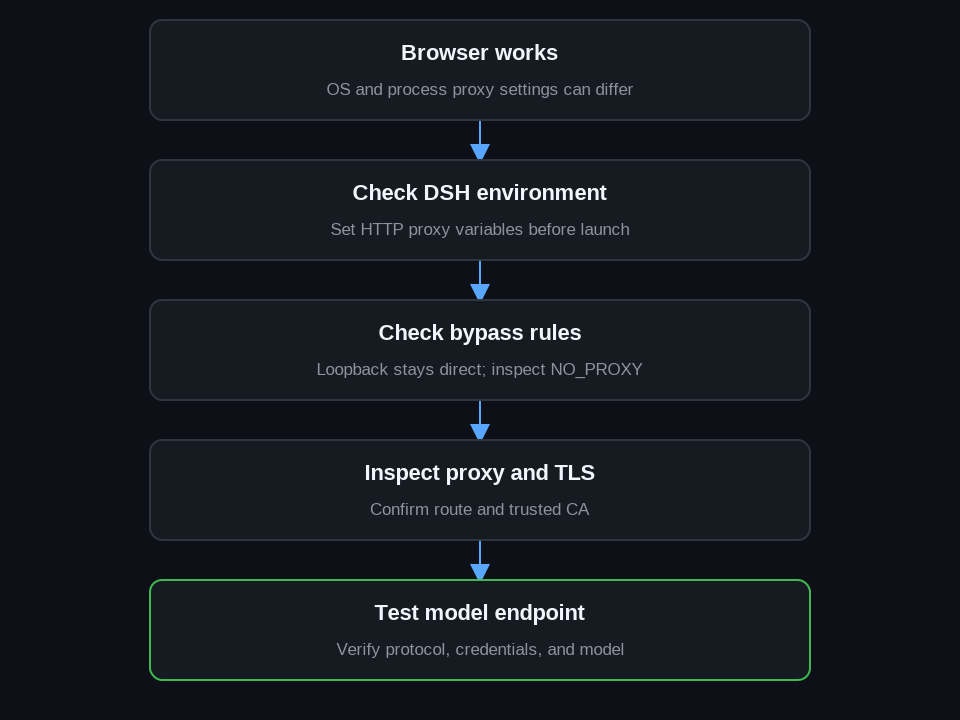
DeepSeek Harness: how do you set the proxy for a launch?
For a local HTTP proxy listening at the example address, the guide gives:
export HTTPS_PROXY=http://127.0.0.1:7890
export HTTP_PROXY=http://127.0.0.1:7890
Replace the address and port with the HTTP proxy actually provided by your environment. Export before starting dsh, so the process inherits the values. Alternatively, the guide allows these values in $DSH_HOME/.env, defaulting to ~/.dsh/.env; an exported variable wins over that file. A project's own .env cannot set proxy variables: DSH refuses to start rather than letting a repository determine the traffic route.
ALL_PROXY can provide a fallback for both schemes; explicit HTTPS_PROXY remains clearer. SOCKS URLs are unsupported: the guide says an unsupported value is reported and skipped, and the affected scheme connects directly rather than borrowing a usable proxy set for the other scheme. Use the proxy application's HTTP port, if available. Do not assume that a port shown in this example matches your installation.
DeepSeek Harness: what bypasses the proxy?
NO_PROXY names hosts to reach directly. A host entry also matches its subdomains; a leading dot or *. is accepted, an entry can include a port, and * bypasses everything. CIDR ranges do not work in this list. DSH always bypasses loopback, including localhost, 127.0.0.0/8, ::1, and 0.0.0.0, so a local endpoint is reached directly.
The guide also identifies paths that stay direct or have other restrictions. Workflow workers and Node PTC processes do not receive proxy settings; code they run must configure its own proxy if needed. The OTLP usage telemetry exporter connects directly. A web_fetch to a literal private address is refused rather than sent to the proxy. Consult the Web access reference for fetch-specific validation: web access and model requests are distinct paths, and a fetch test alone does not establish that a model endpoint works.
Commands run through the bash tool and child MCP servers can inherit proxy variables. For Node child programs, the guide specifies Node 22.21 or later for honoring them; older Node versions connect directly. This differs from the explicitly excluded worker and PTC paths. Check the actual process and runtime before assuming every child uses the same route.
DeepSeek Harness: how can you isolate the failing hop?
- Record where DSH runs, the selected provider and model, the sanitized endpoint and the error. Determine whether the browser and DSH even run on the same machine.
- Confirm the intended HTTP proxy address with its operator. Set variables before launching DSH, then inspect the proxy application's connection log while making a small request.
- Compare the destination against
NO_PROXYand the automatic loopback bypass. A local model server is not expected to appear as a proxied connection. - If the proxy is reached but TLS fails, check whether an organization requires a trusted CA. The guide documents
NODE_EXTRA_CA_CERTSfor its CA bundle, read by Node at process start; obtain the correct certificate from the organization. - If the service responds, inspect the actual response and check URL, protocol, credential and model ID using custom endpoint diagnosis. A working proxy cannot correct a wrong API key.
The proxy guide uses a headless page-fetch task as a route check. That can establish evidence for the fetch path, but the target for your model request and its authentication still need a separate test. Keep before-and-after conditions comparable and avoid exposing the proxy URL if it includes a password.
How do you compare two network paths?
Start by naming the process, destination and time for each observation. “The browser works” may mean a public website loaded on a laptop, while DSH runs on a remote server and calls a different model API. The two results are not directly comparable. Record where the DSH process starts and which endpoint it attempts to contact; then inspect the route available in that environment.
When a connection appears in the proxy log, compare its destination with the intended model endpoint. A page fetch to a public test site is a useful proxy experiment, but it does not validate the model service's API path, key or model. Likewise, a request that bypasses the proxy because of a host rule should not be interpreted as evidence that the proxy is broken. Check the applicable bypass rule before changing ports or credentials.
If a corporate proxy intercepts TLS, a reachable proxy may still produce a certificate error. The documented CA setting must point to the organization's trusted bundle and be present before Node starts. Confirm the file and policy with the organization; do not disable certificate validation just to make a test pass. If the error instead comes from the model service after a connection succeeds, return to provider and authentication diagnosis.
Keep one sanitized baseline for comparison. Note which proxy variables were present without publishing their values when they contain credentials, whether the target was local, and the precise stage at which the request failed. After a change, repeat the same small request. A new result is most useful when the environment and destination are otherwise unchanged.
The proxy guide also says a project-owned .env cannot choose proxy variables. If a launch reports that such a variable was rejected, inspect the source of the setting rather than moving an untrusted value into a higher-priority environment. The process owner should decide the intended route and configure it in an appropriate trusted location. After changing the launch environment, restart the DSH process so startup-time proxy resolution can run again.
Different destinations can legitimately use different paths in one invocation. A public model gateway may use the configured proxy while a local service is reached directly. A matching NO_PROXY host can also bypass the proxy. Document the expected route for each endpoint before interpreting connection logs; this makes missing proxy entries explainable and prevents unnecessary changes to a working local service.
For a persistent deployment, record the owner of the proxy configuration and the procedure for rotating any related credentials. A password embedded in a URL is inherited by applicable child commands, so a successful connection does not resolve the exposure described in the guide. Consider the full execution environment when choosing authentication, and sanitize both proxy and application logs before sharing them.
DeepSeek Harness: what are the limits and safety boundaries?
A proxy URL may contain credentials. The guide warns that child commands can read inherited environment variables and a command printing its environment can persist the password in output. Prefer a credential-free proxy entry point or another authentication mechanism when that exposure matters. Do not publish raw environment dumps, proxy logs, model prompts or authorization headers while seeking help.
The Web reference describes validation and restrictions for web fetching; it also notes that restricting private destinations does not prevent sending data to a public URL. Proxy configuration is a routing choice, not a data-loss prevention guarantee. Use trusted endpoints and understand what the task can send. A browser success, proxy log entry or successful test request is evidence for that particular route, not proof that all DSH processes and network destinations use it.
DeepSeek Harness: what do the terms mean?
- HTTP proxy: an intermediary to which the configured HTTP or HTTPS request route is sent.
NO_PROXY: host patterns that bypass the proxy.- Loopback: an address referring to the local machine, automatically bypassed by DSH.
- TUN: a virtual network interface that can route traffic independently of per-process proxy variables.
- CA bundle: trusted certificate material used to verify TLS connections.
Frequently asked questions
Does DSH read the OS proxy settings?
The guide says it reads proxy environment variables at startup instead.
Can I use a SOCKS URL?
The guide says SOCKS proxy URLs are unsupported and skipped.
Does NO_PROXY support CIDR?
No. Use the documented host and domain matching rules.
Sources
Every claim in this article was checked against the sources below. Community discussions are user reports, not official behavior.
This is an independent community article, not official DeepSeek documentation. Listing a plugin in the registry is not a security review.