Connect DeepSeek Harness to an OpenAI-Compatible API
Connect DeepSeek Harness to an OpenAI-compatible endpoint by adding a custom model API with the gateway’s exact base URL, matching protocol, credential, and model ID, then test a real request.
DeepSeek Harness: what information does a custom endpoint need?
The provider guide recommends Settings → Models → Add model provider → Custom model API for a relay, company gateway, self-hosted service, or provider absent from the installed catalog. Provide a lowercase provider ID, base URL, API protocol, credential and at least one model. The ID is permanent because requests, saved sessions, defaults and credential references use it. To rename it, add another provider and delete the old one; the display name and other editable settings can be changed.
| Field | Decision to verify | Typical failure to investigate |
|---|---|---|
| Base URL | Use the API base documented by your gateway | Wrong host, prefix, or route |
| Protocol | Choose the API the endpoint actually speaks | Incompatible request or response |
| Credential | Use the gateway's intended authentication | Missing, stale, or wrong key |
| Model ID | Enter an ID served by that route | Model absent or unavailable |
The picker offers OpenAI Chat Completions, OpenAI Responses, and Anthropic Messages. Their stored values are openai-completions, openai-responses, and anthropic-messages. A provider speaks one protocol, so a gateway serving two needs two provider entries. “OpenAI-compatible” alone does not tell you which of the two OpenAI protocols your service implements.
DeepSeek Harness: how do you configure and test it?
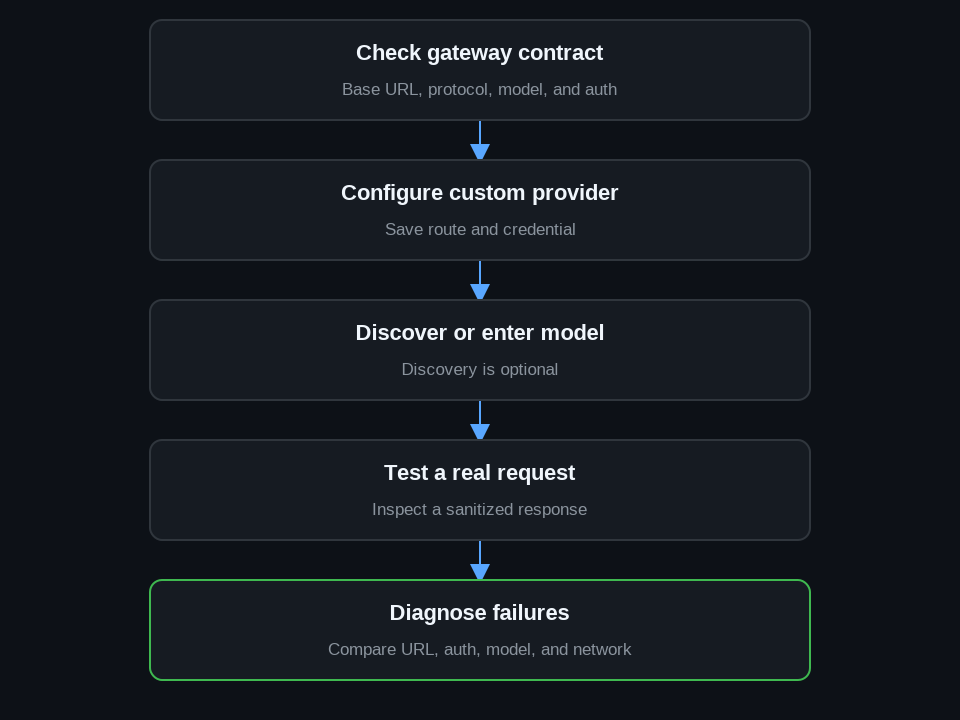
- Obtain the gateway's documented API base URL, supported protocol, model ID and authentication requirements from its operator. Confirm whether its published base includes a path prefix; do not guess or append an endpoint path without checking that service's instructions.
- In Settings → Models, add a custom model API. Enter a lowercase provider ID and the matching base URL and protocol, then provide the credential through the supported field.
- Use Fetch available models if the endpoint supports discovery. Select the desired models and save the provider. If discovery fails or returns nothing, the guide permits entering model IDs manually.
- Select the model and send a small request. Model changes take effect on the next request; an existing session that has already sent a request retains its recorded model.
- If the request fails, keep the sanitized error and compare URL, protocol, credential and model one at a time. Check the gateway's own logs and documentation as well as DSH's diagnostics.
Discovery is a convenience, not an authentication or generation guarantee. A model list can be available while a generation request still fails, and a gateway can support generation without answering discovery in a recognized format. The installed catalog answers discovery for built-in providers even when their base URL points at a gateway; use a custom provider to query that gateway's list.
DeepSeek Harness: how do credentials reach the request?
The Models page treats saved keys as write-only: after saving, the page receives a redacted descriptor, while settings hold a credential reference. The credentials reference says adapters resolve a reference per model request, so a changed credential can reach the next request without a restart. For the credential seam, a stored value takes precedence over ambient fallbacks; removing it can make a fallback effective again.
A detected environment credential is only a detection hint. It does not validate the secret or test the endpoint. If authentication fails, verify which credential source is active and whether the gateway accepts it, without copying the key into an issue or log. Provider-managed credentials and environment fallbacks have different lifecycles; rotating one source does not prove another is no longer selected.
The configuration catalog documents provider fields for advanced setups. A profile patch replaces the full target row's config, so hand-editing a provider entry can remove other providers unless they are preserved. See configuration layer precedence and the broader models and providers guide.
DeepSeek Harness: how can failed requests be narrowed down?
First distinguish a failure to connect from a response returned by the service. A malformed base, a proxy or certificate issue, authentication rejection, unsupported protocol, and a wrong model ID can all present as “the model does not work,” but require different evidence. Record the provider and model identifiers, the sanitized URL and response, and whether discovery or generation failed. Do not infer a specific cause solely from a status code without the gateway's own documentation.
Next compare the service's documented base and protocol with the form. A gateway might implement Chat Completions but not Responses, or expect a specific path prefix. Check the exact capability rather than trying every combination in a production session. If the response points to authentication, verify the source and scope of the credential with the operator. If a manually entered model fails, verify that exact ID and the account's access.
The LLM streaming reference describes text, reasoning and tool-call blocks, and terminal errors in the adapter stream. A successful basic text request therefore does not prove every model capability or tool-call format works through a gateway. Test any required capabilities separately with suitable inputs.
What evidence helps the gateway operator?
Provide the time of a small test, the provider and model identifiers, and the endpoint host or a sanitized equivalent. State whether failure occurred during model discovery or generation, and include the error category and any request identifier that can be safely shared. The operator can then correlate the event with server-side records without receiving your API key or the full prompt.
A gateway's advertised compatibility can cover only part of an API. For example, successful model listing does not establish that streaming, images, or tool calls are supported for the same model. The LLM reference describes multiple kinds of stream content, so test the capabilities your application actually requires. Record the gateway version or configuration when the operator supplies it; behavior can differ across installations.
When moving from a built-in provider to a custom gateway, review the model selection in new and existing sessions. The guide says choosing a model establishes the default for new sessions, while an already-used session retains its recorded model. Testing in a fresh session can help establish which model was selected, but preserve the earlier session's evidence if it is needed for diagnosis.
Keep changes reversible. If the old provider remains necessary, verify its role before deleting it. Provider IDs are stable identities used beyond the display name; changing an ID by replacing a provider can affect saved defaults or sessions. Document the intended migration and select the new model explicitly rather than assuming a renamed display label changed the route.
The provider guide distinguishes the editable display name from the permanent provider ID. Use a stable, meaningful ID when creating the route, especially if sessions and defaults will refer to it over time. If the endpoint operator later changes the hostname but retains the same service contract, review the editable base URL and retest rather than assuming a display-name edit changes routing.
For authentication, a saved credential and an environment fallback may both exist. The credential reference describes stored-value precedence for its seam; verify the actual source in your deployment when a rotation appears ineffective. Removing a saved value can expose an ambient fallback, so coordinate changes with whoever manages the environment. Never test by printing the secret into a shared log.
A reproducible handoff includes the selected protocol and model, the sanitized base URL, the kind of credential source, and whether the failing operation was discovery or generation. Include a minimal error description and the time of the test. That lets the gateway operator investigate the right request without receiving a confidential prompt or key.
DeepSeek Harness: what are the limits and safety boundaries?
A gateway receives the requests routed to it; assess its data handling and access controls before sending real workspace content. Avoid publishing API keys, authorization headers, private endpoint details, or raw prompts in troubleshooting reports. A masked key field does not prove the gateway accepted the key or that the gateway is appropriate for sensitive data.
Network routing is independent of model selection. If the browser works but the DSH process cannot reach the endpoint, check the process environment and network proxy guide. Loopback endpoints and corporate TLS interception have their own routing constraints. Verify the installed DSH version and the provider's current API documentation when behavior differs from these examples.
DeepSeek Harness: what do the terms mean?
- Base URL: the API root supplied to the provider configuration.
- Provider ID: the stable route identity used by requests and stored settings.
- Protocol: the request and response format expected by the endpoint.
- Model discovery: asking an endpoint for a list of available models.
- Credential reference: a name used to resolve a secret without putting its value in settings.
Frequently asked questions
Does model discovery prove generation works?
No. Discovery and generation are separate requests and capabilities.
Which OpenAI protocol should I choose?
Choose the protocol your gateway documents and implements.
Does a detected key prove authentication?
No. Detection does not validate the key or test the connection.
Sources
Every claim in this article was checked against the sources below. Community discussions are user reports, not official behavior.
This is an independent community article, not official DeepSeek documentation. Listing a plugin in the registry is not a security review.