DeepSeek Harness: Where Does --profile Go?
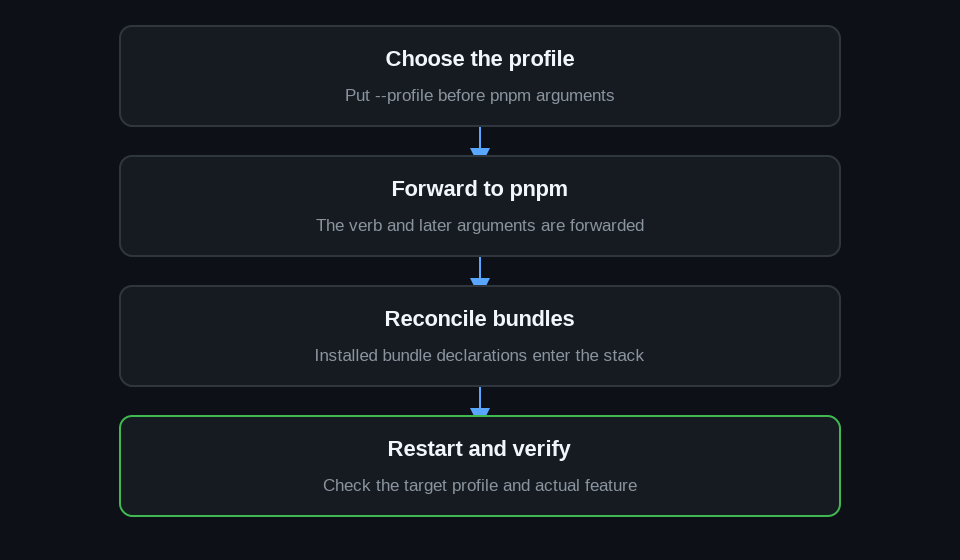
In DeepSeek Harness plugin management, put --profile <name> immediately after dsh plugin and before the pnpm arguments. Once forwarding starts, a later --profile is passed on rather than selecting the DSH profile.
DeepSeek Harness: where does the argument go?
The documented form is dsh plugin --profile <name> <args...>. For example, the CLI reference gives:
dsh plugin --profile tui add github:deepseek-harness/turtle-ui
Here tui identifies the profile and add starts the forwarded pnpm arguments. The CLI reads its own --profile only before forwarding starts, at the first token the plugin forwarder does not recognize. Everything after the pnpm command reaches pnpm verbatim. Consequently, placing --profile after add does not select the DSH profile for this operation. Do not rely on that rearrangement as an equivalent spelling.
This parsing rule belongs to plugin management. Profile startup has its own syntax: dsh <name> is shorthand for dsh --profile <name>, and the shorthand name must immediately follow dsh. The token plugin selects plugin management, so a profile actually named plugin must be started with dsh --profile plugin.
DeepSeek Harness: what does the command change?
The CLI initializes the target profile if it is missing, then runs pnpm with the profile directory as its working directory. The reference says pnpm must be on PATH and that verbs such as add, remove, why and update are forwarded. Relative path specifications, including . and ../plugin and their file: or link: forms, are anchored to the invoking directory first. This makes a local checkout address refer to the caller's location instead of unexpectedly resolving inside the profile directory.
After a successful pnpm operation, DSH reconciles dsh.profile.bundles with the installed state. A dependency whose manifest declares the documented DSH bundle patch joins the layer stack; a dependency without the bundle declaration remains an ordinary dependency with a warning. A removed dependency leaves the stack. An update that gains the bundle declaration can therefore change bundle membership.
| Step | What it determines | What it does not establish |
|---|---|---|
--profile <name> before forwarding | Which profile receives the operation | That an installed package is a bundle |
| pnpm operation succeeds | The dependency operation succeeded | That a running profile has reloaded membership |
| Bundle reconciliation | Which declared bundles enter the profile stack | That every optional feature is enabled |
| Restart the target profile | The next start reads the changed bundle set | That the plugin source is trustworthy |
The running profile retains its bundle set from its current start. Restart the affected profile after adding, removing or updating a bundle. This is a different boundary from ordinary patch edits; their live-update behavior depends on the composition. See why a profile needs a restart for that distinction.
DeepSeek Harness: how should you run and verify an operation?
- Identify the intended profile and the package source. The profile name and package specification answer different questions: one selects the installation target, the other identifies what pnpm should act on.
- Write
dsh plugin --profile <name>before the intended pnpm verb and its arguments. For example, use the documentedtuicommand above only if that profile and package are your intended targets. - Review the source and the implications of the pnpm operation. If using a local path, start from the directory against which the reference says it will be resolved.
- Run the operation and inspect its output. An initialization of a missing profile is a real side effect, so check the target name carefully before running it.
- Restart the affected profile if bundle membership changed, then inspect the installed entry and test the feature you actually need. A successful installation alone does not establish that the profile exposes or enables that feature.
The reference also documents dsh plugin --profile tui remove turtle-ui. Removal changes the target profile's dependencies; it is not simply a display filter. Check the target before running any such command, especially when a similar package appears in several profiles.
DeepSeek Harness: how do help and the marketplace relate?
The argument boundary also affects help. -h or --help before forwarded arguments prints the plugin forwarder's help. If the forwarded arguments begin with a pnpm command, a later help flag reaches pnpm. If forwarding begins with a pnpm option such as --filter <selector> or -r, a later help flag still prints forwarder help; put the pnpm command before the help flag to reach pnpm's help. This is a parsing detail, not evidence that the package operation ran.
The plugin marketplace guide describes a separate Web discovery flow. An index source belongs to the current profile, and installation presents the selected version's source before confirmation. The guide says DSH ships no index source by default. Thus, selecting a profile for a CLI operation and viewing a profile's marketplace source are related by profile scope but are not interchangeable commands or interfaces.
A marketplace listing identifies a candidate package and version. Its compatibility presentation helps choose a listed version, but it is not proof that the package or its install-time code is appropriate for a particular environment. Compare the displayed source to the package you intend to install.
DeepSeek Harness: what are the limits and safety boundaries?
The CLI forwards pnpm arguments; the DSH profile selector does not validate the intent or provenance of a package. Installation may run package build steps. The reference notes that Git-hosted source packages can require pnpm build approval and that an initial add may fail with an allowBuilds hint; follow the actual output and inspect the source rather than granting a guessed allowance.
Avoid pasting credentials into package specifications or shared command output. Before removal or update, consider the profile's users and keep a way to restore the intended dependency state. A restart makes new bundle membership available to the next start; it is not a security review or proof that all dependent functionality works.
DeepSeek Harness: what do the terms mean?
- Profile: the selected DSH composition and its profile directory.
- Forwarded arguments: tokens handed to pnpm after the plugin forwarder stops parsing its own options.
- Bundle: a package whose manifest declares a DSH bundle patch for the profile layer stack.
- Reconciliation: updating the profile's bundle list to reflect the installed dependencies after a successful operation.
- Marketplace index: a profile-scoped list of installable versions and their source information.
Frequently asked questions
Where does --profile go?
Put it after dsh plugin and before the forwarded pnpm arguments.
Does installing a bundle update a running profile?
The running profile retains its startup bundle set; restart it after membership changes.
Does the command create a missing profile?
The CLI reference says plugin management initializes a missing profile.
Sources
Every claim in this article was checked against the sources below. Community discussions are user reports, not official behavior.
This is an independent community article, not official DeepSeek documentation. Listing a plugin in the registry is not a security review.