DeepSeek Harness Python SDK: Your First Task
Install the DeepSeek Harness Python SDK in a virtual environment, provide an API credential, and run the documented example with an isolated workspace and Harness home using the bundled sdk-minimal profile.
DeepSeek Harness: What do you need before the first task?
The Python SDK guide requires Python 3.10 or later, Git, a supported platform, a DeepSeek-compatible API endpoint and credentials, and isolated workspace and Harness home directories. Its listed platforms are Linux x64 or arm64, macOS 14 or later on arm64, and Windows x64. Check the guide for current platform support before assuming another platform is covered.
A workspace is where the task runs. The Harness home owns the profile, installed plugins, and session data used in this example. Use disposable paths you understand; the minimal profile uses a shell with danger-full-access, so the working directory is not an access boundary. A task that asks the agent to inspect or change a repository can expose or modify files reachable by that shell.
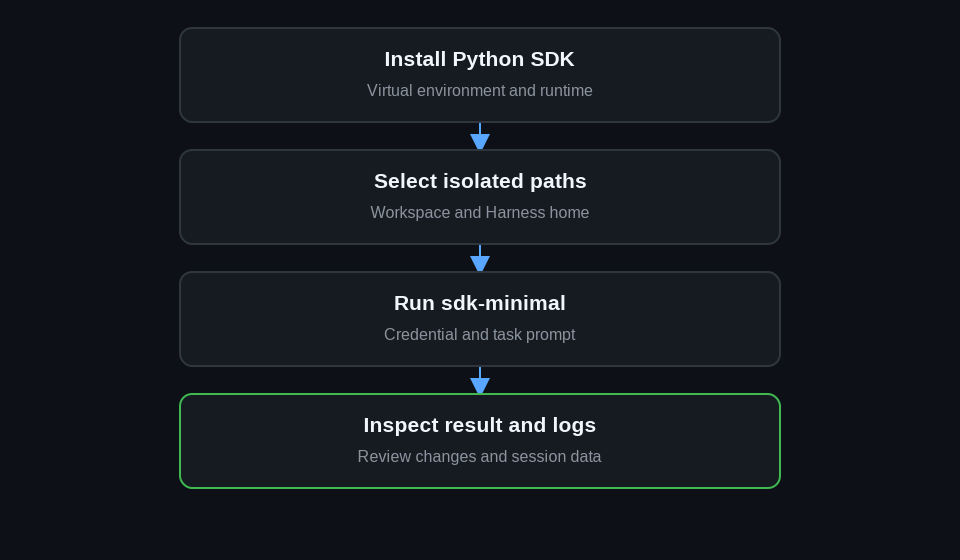
DeepSeek Harness: How do you install and run the example?
The guide clones the repository because the example script lives in that checkout. These Linux/macOS commands create a virtual environment and install the published package:
git clone https://github.com/deepseek-ai/deepseek-harness.git
cd deepseek-harness
python -m venv .venv
. .venv/bin/activate
python -m pip install deepseek-harness-sdk
The package includes a matching native runtime wheel and dsh; ordinary SDK execution does not require system Node.js. On Windows, the guide uses py -3.10 -m venv .venv and .venv\Scripts\Activate.ps1 instead. The SDK install is distinct from a contributor build of the repository.
- Set
DEEPSEEK_API_KEYin the shell without publishing the value. If using a compatible proxy, the guide also documentsDEEPSEEK_BASE_URL. - Choose absolute paths for a disposable workspace and a separate home. Replace the placeholders below with paths on your machine.
- Run the checked-in example with a new session ID:
python python/sdk/examples/minimal.py \
  --workspace /absolute/path/to/disposable-workspace \
  --dsh-home /absolute/path/to/example-dsh-home \
  --session-id example-001 \
  "Inspect the repository and fix the failing tests."
- Inspect the final assistant response and any resulting changes. The example can modify files: use a suitable disposable checkout or container, not a sensitive working tree.
- For a separate task use a new session ID. Reuse the same harness, home, and ID only when continuing the same persistent conversation and session resources.
The selected home stores the generated sdk-minimal profile, installed plugins and uncompressed JSONL logs under sessions/. The example and SDK do not silently read ~/.dsh. The session reference describes a session as an append-only event log from which model message history is derived. Treat those logs as potentially sensitive task data.
DeepSeek Harness: How does Python relate to the profile?
The SDK starts a dsh --profile sdk-minimal process lazily and reuses it until the Python context manager exits. It is a client of that process, not a second complete configuration system. The official guide shows this direct form:
from pathlib import Path
from deepseek_harness import DeepSeekHarness

workspace = Path('/absolute/path/to/disposable-workspace').resolve()
home = Path('/absolute/path/to/example-dsh-home').resolve()
with DeepSeekHarness(
    provider='deepseek-official', model='deepseek-v4-flash',
    max_tokens=49_152, cwd=str(workspace), dsh_home=str(home),
    profile='sdk-minimal',
) as harness:
    result = harness.run('Inspect the repository and fix the failing tests.',
                         session_id='example-001')
print(result.final_response)
Profile composition, its persistent patch, the home patch and ordered Python patches determine the application. The CLI reference explains profile layers and says later layers win on the same row; patching replaces that row's whole config value rather than deep-merging its keys. A different profile must contain the SDK app or another JSON-RPC server row. Missing server configuration, unresolved plugins and invalid patches fail startup; they do not cause a fallback to another composition.
DeepSeek Harness: What is included in sdk-minimal?
| Capability | Documented minimal-profile behavior |
|---|---|
| Model-facing tools | Persistent bash on Linux/macOS or pwsh on Windows, plus read_image and working_directory |
| Shell | 300-second timeout and danger-full-access |
| Context | Automatic compaction; the complete session log remains |
| Persistence | Uncompressed JSONL in the selected home |
| Other capabilities | No subagent, Web tools, settings, managed credentials or local instruction discovery |
The SDK guide describes sdk-minimal as a standalone composition that does not include dsh-base; future tools added to the base profile do not implicitly appear in it. The bundled editor exists in the runtime but is not mounted by default. The guide provides a patch for opting into it, and warns that its local filesystem backend resolves relative paths from the working directory without confining access there.
The wheel also includes the separate Web profile. Running dsh web launches a browser application; the guide explicitly says it cannot serve the Python SDK client. Do not assume a running Web UI automatically supplies the SDK's JSON-RPC server or its session configuration.
How should you interpret the first run?
Separate process startup, model access, task execution and result inspection. If the process fails before the task begins, check the selected profile and its configuration layers; the guide says missing server rows, unresolved plugins and invalid patches fail startup. If it starts but the model request cannot complete, check the endpoint and credential without exposing the secret. A completed request can still produce an answer that needs review, so inspect the actual result and any files changed in the disposable workspace.
The example's task asks for a test fix, which is intentionally more than a connectivity check. Choose a prompt appropriate for the environment and review the command and file effects that follow. The SDK's final_response is the final assistant text; it should not be treated as a replacement for reviewing tests or changes. Keep a record of which home, workspace and session ID were used so that a later run can be understood in context.
When should you change the composition?
Start with the documented minimal profile when its capabilities match the task. Its standalone bundle defines an explicit tree rather than inheriting future additions to the base profile. This gives a clearer inventory, but also means a desired tool may not be present. The guide's editor example adds a specific row through a patch; inspect the entire effective configuration and the tool's effects before using it.
For a one-run change, the Python constructor accepts an ordered tuple of patch files. For a persistent change, the guide points to the profile's cordis.patch.yml. The CLI reference describes the order in which bundle, profile, home and command-line layers apply. A patch replacing a row's config is not a deep merge, so preserve fields that the resulting configuration requires. A failed load is more informative than assuming an invalid change was silently ignored.
The guide also documents plugin management in the selected home, including initializing the bundled profile and adding a bundle with dsh plugin. That management operation uses pnpm, even though ordinary execution of the installed SDK does not require it. Treat plugin installation as a separate change to the home and inspect the plugin source and permissions; package availability does not prove its behavior is suitable for your environment.
DeepSeek Harness: What are the limits and safety boundaries?
danger-full-access permits the minimal shell to change any path visible to the runtime. A disposable checkout or container is an operational precaution; check its actual isolation separately. Keep credentials and unrelated material outside the task environment where possible, and review changes before applying them elsewhere. A prompt asking the agent to fix tests can lead to file modifications.
Automatic compaction may make an extra model request and does not delete the complete session log. The guide also says the DeepSeek session-log contributor uploads unaccepted log events by default, subject to its documented byte limit, and documents an opt-out in the profile patch. Check that behavior and your data-handling requirements before sending private material. SDK prompt text does not execute /compact or other slash commands. See model configuration for related provider context.
DeepSeek Harness: What do the terms mean?
- SDK: the Python client used to start and communicate with the configured DSH process.
- Profile: the selected application composition and its configuration layers.
- Harness home: the selected location for profiles, plugins and session data.
- Session: a persistent conversation and event history identified by a session ID.
- Compaction: a model-generated summary of earlier history used to manage context pressure; it does not erase the complete log.
Frequently asked questions
Does the SDK need system Node.js?
Ordinary SDK runs use the included native runtime and do not require system Node.js.
Is the working directory a sandbox?
No. The minimal profile uses danger-full-access and its shell can access paths visible to the runtime.
Does a new task require a new session ID?
The guide recommends a new ID for independent work; reuse the same ID when continuing the same persistent conversation.
Sources
Every claim in this article was checked against the sources below. Community discussions are user reports, not official behavior.
This is an independent community article, not official DeepSeek documentation. Listing a plugin in the registry is not a security review.