DeepSeek Harness: Set the Web Host and Port
Set the DeepSeek Harness Web listener with the Web profile's --host and --port arguments, then verify the actual bound address and the configuration layer that supplies it.
DeepSeek Harness: Which arguments control the listener?
The CLI reference lists --host and --port as Web application arguments. For example, it documents:
dsh --profile web --port 8080
The generated Web command help also gives a host example:
dsh --profile web --host 10.0.0.7
Use an actual concrete address assigned to the local interface; 10.0.0.7 is only the documentation's example. The launcher consumes its own options first and hands subsequent application arguments to the selected profile. The reference explains that the Web startup service supplies the resolved value to the configured row, whose expression reads the port. A flag takes precedence only while that expression remains in the row. A user patch that replaces the whole config with literals removes the runtime read and can make the flag ineffective for that row.
DeepSeek Harness: Which host address is accepted?
The HTTP server reference requires a concrete IPv4 or IPv6 literal for one local interface. The shipped Web command selects loopback by default. A loopback literal, including addresses in 127/8 and ::1, confines the listener to the machine; a non-loopback literal serves the network belonging to that address. An unspecified address is rejected at load, including IPv4 any, IPv6 any and mapped forms of IPv4 any.
| Choice | Documented effect | Check |
|---|---|---|
| Loopback literal | Listener stays on the machine | Use for local browser access |
| Concrete non-loopback literal | Serves that interface's network | Review who can reach it and the HTTP/TLS setup |
| Unspecified address | Rejected during load | Select one concrete interface instead |
Port 0 | Requests an OS-assigned port | Read the actual bound port |
A host is a bind address, not necessarily the address advertised to clients. The server reference says --public-url changes only the advertised URL. The bind address and --trusted-host govern which browser Host is accepted by the shipped Connection plugin. For reverse-proxy and public deployment details, see public URL and trusted hosts.
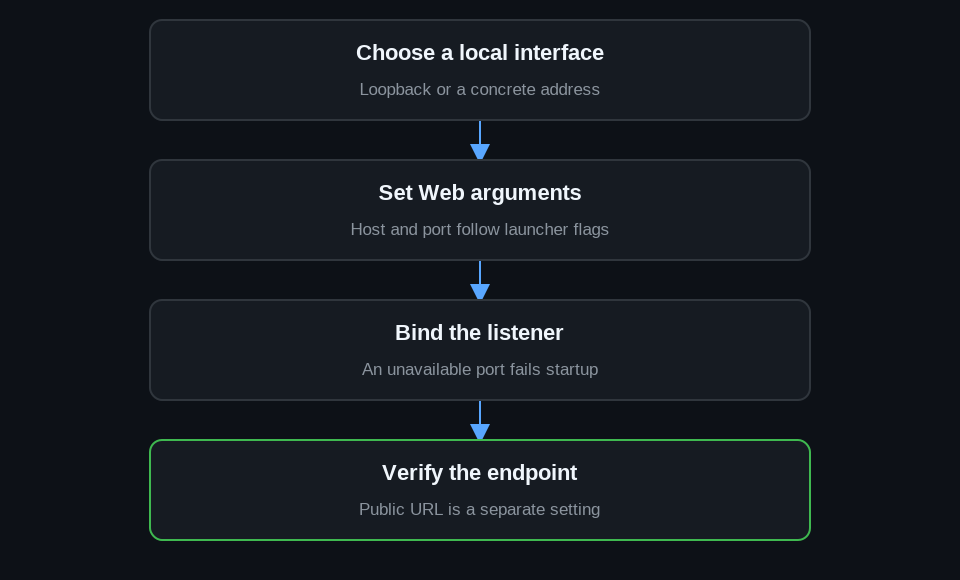
DeepSeek Harness: How do I set and verify the address?
- Decide whether local access is sufficient. The default Web command uses loopback; choosing another concrete local interface changes the network reach of the listener.
- Start the Web profile with the relevant application options after launcher options. The documented
--port 8080example above changes the requested port. The Web profile also accepts--hostwith a concrete local address. - Check startup output and open the URL actually reported for the running application. When port
0is configured, the operating system chooses a port; the server'sportproperty reads the actual listening value after binding. - If startup fails, read the error. The server reference names
EADDRINUSEas an example of a listen failure that rejects initialization. Select an available port or resolve the conflicting listener, then retry. - If a flag appears ignored, inspect the composed profile and patches. A complete row replacement may have removed the expression that reads the startup service. Compare the row with the shipped composition before changing it.
To inspect composition without booting, the CLI reference gives dsh --profile web --dump-config. A dump shows the tree before application arguments are resolved and rejects application arguments, so run it separately from the actual --port invocation. It can initialize missing profile files. The dump preserves !!js expressions unevaluated; it is evidence about configuration, not a report of the bound socket.
DeepSeek Harness: What changes after startup?
The Web server listens on activation. The CLI reference says a flag beats the value beside the expression while that expression remains. With HMR enabled, a patch-file edit re-evaluates expressions against services that are still up, so it cannot reset a served port. To change the startup argument, start a new process with the intended options rather than relying on a live patch to alter the already supplied startup service.
The server also accepts TLS configuration. Both certificate and key are read once before binding; unreadable, empty, invalid or mismatched material rejects initialization instead of falling back to HTTP. Replacing certificate files requires a reload. These are listener behaviors, separate from changing the public URL. A browser failure can arise at binding, network reachability, Host/Origin checks, or authentication; the visible symptom alone does not select one layer.
When comparing a reported URL with a bind, keep the questions separate: which interface accepted the socket, which port was actually assigned, what URL is advertised, and which browser Host the Connection accepts. A correct answer to one does not establish the others. For example, an OS-assigned port requires checking the bound result, while a public URL can advertise a different client-facing address without changing the socket.
The CLI help boundary matters too. The reference says dsh --profile web --help prints the Web application's help without booting it, whereas dsh --help prints launcher help. Use the help for the selected profile to inspect its app options. Put launcher options first so that they are not mistaken for arguments forwarded to the application.
DeepSeek Harness: What are the limits and safety boundaries?
The server carrier itself does not own authentication or Origin policy. The shipped Web composition adds Connection checks and browser-session authentication, but another composition must establish its own policy. The server uses plain HTTP unless TLS is configured, and the shipped command warns when a non-loopback bind serves plain HTTP. Selecting a specific address or seeing a successful startup does not establish that a deployment is safe.
Before exposing an interface, assess network access and follow the deployment documentation for authentication, TLS and proxy settings. Do not assume --public-url changes the bound interface. Headless and other profiles have different app arguments and composition; the Web flags should not be assumed to apply to them.
DeepSeek Harness: Which terms matter?
- Bind address: local interface address on which the server listens.
- Port: listener endpoint number; zero requests an operating-system choice.
- Loopback: an address that keeps the listener on the local machine.
- Public URL: advertised client URL, separate from the bind address.
- HMR: configuration reload coordination, subject to the composition and startup-service boundaries.
Frequently asked questions
Can the server bind an unspecified address?
No. The server rejects unspecified addresses at load.
What does port 0 do?
It requests an operating-system-assigned port.
Does public URL change the bind?
No. It changes the advertised URL.
Sources
Every claim in this article was checked against the sources below. Community discussions are user reports, not official behavior.
This is an independent community article, not official DeepSeek documentation. Listing a plugin in the registry is not a security review.