DeepSeek Harness: Find Plugin Config Defaults
Use the DeepSeek Harness plugin configuration catalog to locate a package's declared fields and descriptions, then check its runtime schema and the selected profile's composition before assuming a default or effective value.
DeepSeek Harness: where are fields documented?
The generated plugin configuration catalog lists the configuration declarations received by loadable harness packages. Each package entry includes its declared type and documentation, referenced types, a source link and, where applicable, injected services. It is organized around deployment configuration. The model-facing tool catalog and subsystem service interfaces answer different questions.
Search for the actual package name, then read the complete declaration rather than a single matching field. The catalog includes package-local referenced types and links other types. It also warns that a full declaration can include a runtime-only seam deliberately excluded from the schema; that field's documentation identifies it, and it cannot be set through cordis.yml. The catalog covers the harness packages, not every vendored Cordis plugin a tree might load.
DeepSeek Harness: how do you read a catalog entry?
For example, the @deepseek-ai/dsh-acp entry documents provider, model and sessionListPageSize as optional configuration fields. It also labels stream as a runtime-only transport override. The latter appears in the type but is not a normal YAML configuration setting. The entry's inject list identifies required services, and its source link points to the declaration. The catalog does not establish a concrete default for each of these fields merely by listing their types.
Another entry, @deepseek-ai/dsh-agent-default-model, describes provider, model and reasoningEffort; its documentation says omission of reasoning effort follows the provider default. That is a useful distinction: a provider-dependent default is not one universal literal value. The entry's source and referenced types provide context when the field is wrapped in a type such as Volatile.
| Evidence | What it can tell you | What it cannot prove alone |
|---|---|---|
| Catalog declaration and JSDoc | Field names, types, descriptions and documented defaults | Effective values in a running profile |
| Native plugin schema | Validation and defaults declared by that installed plugin | That a different version has identical behavior |
| Composed configuration dump | Unevaluated rows and their layers | All runtime expression results or application argument effects |
| Schema dump | Projected fields, defaults and supported constraints | Complete native validation or successful boot |
An optional marker means a value may be omitted from the declared type; it does not itself give the value that will be used. A comment such as an explicit default is stronger evidence, but still check which version and configuration you are operating.
DeepSeek Harness: how are schema defaults applied?
The plugin configuration guide shows an author defining a Config type and a same-named Schemastery schema. Its example uses Schema.string().default('Hello'), Schema.number().default(3) and Schema.boolean().default(false). When the plugin loads, Cordis uses the exported schema to validate input and fill defaults. These are examples for that tutorial plugin, not default values for unrelated built-in packages.
The guide also demonstrates a required apiKey, a timeout default and a union for mode; invalid input fails plugin loading. A plain object exported as Config is not a substitute for the required Standard Schema interface. These details explain where an author puts constraints, while the installed plugin's own schema determines its actual settings.
Do not equate a type declaration, a schema default and an explicitly configured value. A type tells you the accepted shape at the declaration level; a schema may insert a default during loading; a configured row may supply a different value. Some values can be derived at runtime, so even a configuration dump is not necessarily the final result observed by a running plugin.
DeepSeek Harness: how do you check a specific profile?
The CLI reference documents configuration and schema dumps. For example:
dsh --profile web --dump-default-config
dsh --profile web --patch ./extra.yml --dump-config
The first shows bundle layers; the second includes profile, home and supplied patch layers. Both leave !!js expressions unevaluated. Only --dump-config processes patches, and it reports unmatched patch targets on stderr. They can initialize missing profile files, do not run app command-line providers and reject invocations containing app arguments. Choose the real profile and patch only when you intend to inspect those inputs.
The CLI also documents --dump-config-schema, which projects plugin Config fields, defaults, descriptions and supported constraints for the composed profile into JSON Schema. JSON Schema defaults are annotations, not default insertion. Projection can be partial; diagnostics and nonzero exit status matter even if useful output exists. Native validation remains necessary. Collection imports trusted modules and may invoke Config getters or lazy builders, so do not treat inspection of an unfamiliar plugin as passive reading of a text file.
DeepSeek Harness: what is a practical lookup workflow?
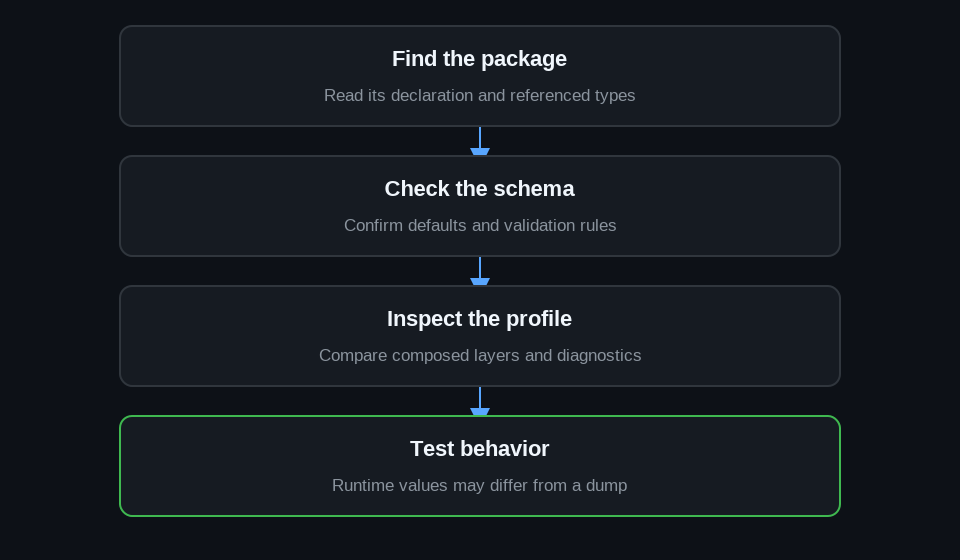
- Identify the installed package and version, selected profile and the setting you need. Search the catalog by package name, not only by a common field name such as
timeout. - Read the declaration, referenced types, comments and source link. Note injected services and any field marked runtime-only. Record whether the documentation actually gives a literal default.
- Check the installed plugin's schema and documentation for constraints and default behavior. If a default is provider-dependent or undocumented, keep it as such rather than guessing a number.
- If appropriate for the environment, inspect the composed profile and its diagnostics. Compare bundle, profile, home and explicit patch inputs; expressions in a dump remain unevaluated.
- Make a scoped change using the plugin's actual schema. Test the affected behavior and retain a way to restore the prior configuration. Review diagnostics before sharing them.
This separates three useful questions: what a plugin can accept, what its schema does when input is omitted, and what this particular deployment actually supplied. They may have different answers. For a more detailed comparison of dump modes, see configuration dumps; for projected JSON Schema limits, see plugin config schema.
DeepSeek Harness: what are the limits and safety boundaries?
A generated catalog is tied to a source version; an installed plugin or third-party package can differ. A missing default in the declaration is not evidence that the effective value is zero, empty or disabled. A successful validation or a configuration listing does not establish that a setting is appropriate or safe for the environment.
Configuration dumps and raw plugin errors can expose sensitive values. The schema dump contains declarations rather than actual configured values, but declared defaults and errors can still be sensitive. Inspect output before sharing. Do not use a schema projection as a substitute for native validation or a behavior test, especially where the projection reports limitations.
DeepSeek Harness: what do the terms mean?
- Config catalog: generated package-by-package declarations and their documentation.
- Schema: the plugin's validation and default rules applied during loading.
- Runtime-only seam: a declared interface member intentionally excluded from YAML configuration.
- Composition: the profile's bundle and patch layers assembled into configuration rows.
- Projection: a representation of native schema information in JSON Schema, possibly with limitations.
- Effective value: the value actually used after configuration and any relevant runtime behavior.
Frequently asked questions
Does an optional field have a known default?
Not necessarily. Consult the installed schema and documentation.
Does a schema dump insert default values?
No. JSON Schema defaults in the projection are annotations.
Are all declared fields settable in YAML?
No. The catalog can include runtime-only seams excluded by the runtime schema.
Sources
Every claim in this article was checked against the sources below. Community discussions are user reports, not official behavior.
This is an independent community article, not official DeepSeek documentation. Listing a plugin in the registry is not a security review.