Run a DeepSeek Harness Headless Task in CI
Use DeepSeek Harness headless with a positional task for a single unattended run, and handle its final text, diagnostics, and exit status as separate signals.
DeepSeek Harness: when is headless the right interface?
The shipped headless profile runs one task without mounting a browser connection, HTTP server, Web runtime, browser client, or listening port. It suits a script or CI job that needs a single result and can manage its own environment. It is not an interactive browser session or a JSON-RPC server; compare the alternatives in profile selection.
The CLI reference describes the one-shot contract. Each invocation creates a fresh persisted agent through the core registry, submits the task, waits for quiescence, and flushes the session before deriving the last non-empty assistant text and the final turn/end reason from the durable interval. The session reference explains why that flush matters: a turn ending does not itself mean the loop awaited a persistence flush.
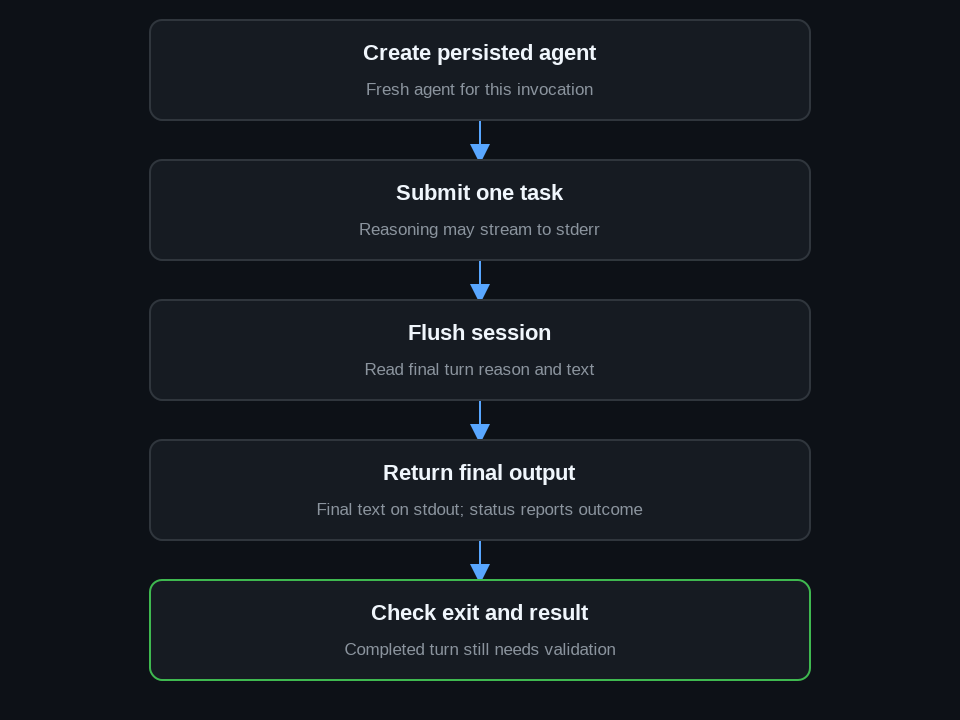
DeepSeek Harness: what does a minimal run look like?
dsh --profile headless "run the tests"
The quoted text is the positional task, not a launcher flag. An invocation without a task is a usage error from the headless app. Launcher flags must precede app arguments: after the launcher encounters the first token it does not recognize, the remaining tokens go to the selected app. Decide any launcher overlays before supplying the task.
- Select a workspace appropriate for the task and configure a working model and credential in the environment used by the job.
- Start with a small, bounded task. The example above is an instruction to the agent, so the actual commands it chooses depend on the repository and model.
- Capture standard output, standard error, and the process status independently. Keep diagnostics available even when the job fails.
- Inspect the result before using it as an artifact or taking a downstream action. A completed turn does not prove the generated answer is correct or that a separate test suite passed.
- Repeat with the same profile, working directory and sanitized inputs when diagnosing a failure. Change one condition at a time.
Base-based profiles use the directory from which the command runs as the default workspace root. That makes CI's working-directory choice consequential: the same instruction can encounter a different repository or instructions when launched elsewhere. The task text itself can be retained in the persisted session, so do not use it as a secret transport.
DeepSeek Harness: what goes to stdout and stderr?
| Signal | Documented behavior | Practical interpretation |
|---|---|---|
| stdout | Only the final non-empty assistant text | Treat it as an answer, not a complete event log |
| stderr | Non-empty provider reasoning deltas stream under dsh: reasoning:; failures may report diagnostics | Keep separate from the answer and review before sharing |
Exit 0 | Final turn reason is completed | The turn completed; validate its content separately |
Exit 1 | Other final turn reasons | The one-shot task did not reach the documented completed outcome |
A successful response with no reasoning leaves stderr empty. The reference does not promise a structured JSON output format, a complete transcript on stdout, or that stderr is a stable machine-readable protocol. Avoid deciding success from the presence of text alone. Conversely, a nonempty stderr does not by itself mean failure: reasoning can appear there during a successful run. Process startup and argument errors are separate from the final-turn mapping, so consult their diagnostics instead of treating every failure as one model outcome.
If a CI system combines streams for display, preserve the status independently. Combining them can make reasoning look like part of the final answer and can expose material that was intended only for diagnosis. Decide retention and access according to the job's data sensitivity.
DeepSeek Harness: how should an unattended job handle approval?
Headless does not automatically grant requested actions. The approval reference distinguishes ask and never: under ask, composed answerers receive the request and a chain with no answerer falls through to unavailable; under never, requests resolve rejected. Consumers fail closed unless the action is approved. The reference describes never as a strict stance for unattended runs, but the selected deployment and session determine actual policy; do not assume a particular policy from the profile name.
Design the job around actions the chosen permissions allow, and make an unavailable or rejected approval an expected operational outcome. Do not weaken confinement merely to make automation finish. A task requiring human judgment may need an interactive workflow instead. Review permission presets for the distinction between approvals and file-effect policy.
DeepSeek Harness: what should a failure investigation record?
Record the exact task with sensitive details removed, the installed version, profile, workspace, exit status, and separate streams. First distinguish a launch or configuration error from a turn that started and ended unsuccessfully. Then check provider configuration and connectivity using the relevant error, not a guess based only on exit 1. A model request failure, rejected tool action, and an incorrect final answer need different remedies.
The session is persisted, but the CLI's stdout is intentionally only the last non-empty assistant text. If more context is needed, use the deployment's documented session facilities and protect their contents. The session record may include prompts, tool inputs and outputs; a sanitized reproduction is more useful than publishing a raw log.
How can a pipeline use the result responsibly?
Treat the process status as the first branch in the pipeline, then validate the text for the pipeline's actual purpose. A request to run tests may produce a narrative about tests; it is not the same artifact as the test runner's own structured report. If a downstream step expects a particular format, define and validate that format in the surrounding system. The headless contract does not promise that a model will always produce it.
A fresh agent per invocation is useful for bounded tasks, but it also means a caller should not assume that a later invocation continues the earlier conversation. The documented result comes from the durable interval of that invocation. If continuity or machine protocol interaction is needed, choose an interface designed for that requirement and consult its own contract.
When an approval is unavailable, record the policy and the action category rather than retrying blindly with broader permissions. A retry with identical inputs can be useful after correcting connectivity or configuration; changing the workspace, policy, or model at the same time makes the result much harder to compare. Keep the original evidence and record the changed condition.
A pipeline owner should also decide what happens when no usable final text is returned, even if the process produced diagnostics. A failed run should not silently publish an old artifact or substitute the previous run's answer. The caller controls artifact naming and retention; verify that the output belongs to the current invocation. This is a workflow design precaution, not an additional exit code promised by DSH.
Before enabling a recurring job, run the exact invocation in the same environment that the scheduler will use. Check that the working directory, provider configuration and inherited credentials are present there, not just in an interactive shell. Record the status and separate streams from this test, and verify the job's failure branch with a controlled failed run. This checks the caller's handling as well as the DSH invocation.
If the task can change files, inspect the resulting diff independently. A turn may complete while leaving changes that need review, or fail after producing partial effects. The documentation does not promise that a failed task rolls back every tool action. Plan the surrounding workspace and recovery procedure accordingly, and do not publish generated changes automatically solely because a text answer looks plausible.
DeepSeek Harness: what are the limits and safety boundaries?
A zero exit status is an execution signal, not a quality or security certification. The agent may run tools within its configured permissions, and the task may touch files or transmit information. Use an appropriate workspace, restrict credentials and review results. The docs do not specify universal time limits or retries for every deployment; impose job-level controls appropriate to your runner rather than relying on an undocumented headless default.
Avoid echoing credentials into logs. Captured reasoning and session data can be sensitive, and the command's task argument can also be visible to surrounding process-management tools. For connection issues, see custom endpoints and network proxy.
DeepSeek Harness: what do the terms mean?
- One-shot: an invocation that submits one task and exits after its run settles.
- Quiescence: the point at which the agent has become idle for this run.
- Session flush: making pending session data durable before reading it.
turn/end: the session event that records a turn's final reason.- Approval answerer: a composed participant that can respond to an approval request.
Frequently asked questions
What does stdout contain?
The last non-empty assistant text, not the complete session log.
Does stderr mean failure?
No. Provider reasoning can stream there during a successful run.
Does exit 0 prove the answer is correct?
No. It indicates the final turn completed; validate the answer separately.
Sources
Every claim in this article was checked against the sources below. Community discussions are user reports, not official behavior.
This is an independent community article, not official DeepSeek documentation. Listing a plugin in the registry is not a security review.